For tile, bathroom and kitchen stores
The bathroom in 3D and the materials list, in the same visit.
Design with your customer in front of you, in the browser. Nothing to install.
€890 per user per year, excl. VAT. No card needed: the trial ends on its own on day 15.
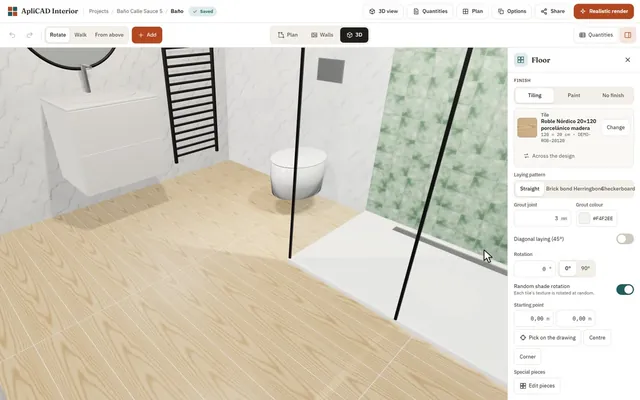
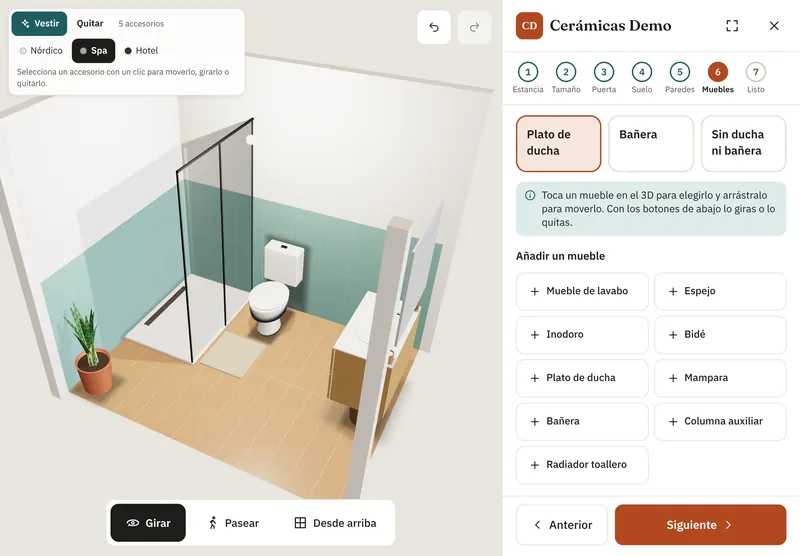
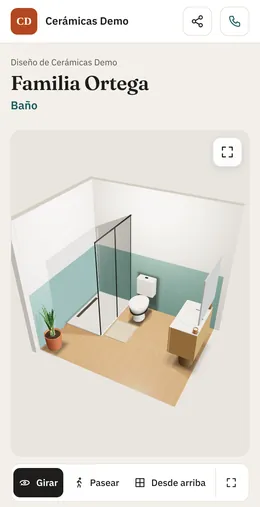
On the counter PC, the showroom tablet and the customer’s phone.
ApliCAD Interior Web runs in the browser on your PC or tablet. Lay tiles piece by piece from your own catalogue, add the furniture, and your customer leaves with their bathroom in 3D on their phone and the materials list in m² and pieces. Nothing to install.
ApliCAD Interior Web in figures
- of rooms match on quantities: checked against 19,930 real rooms from stores2
- 98.95%
- languages: English, Spanish, French, Italian, German, Portuguese and Romanian
- 7
- manufacturers with their materials in the catalogue
- 80+
- 3D furniture models from manufacturers
- 5,147
Customers choose in the store and decide at home. Let them take their bathroom home on their phone.
Some stores take 3 or 4 days to deliver a 3D bathroom design. Meanwhile, the customer keeps visiting other stores.
- One person does the 3DOn the only PC with a graphics card, after the customer has left.
- Customers can’t picture herringbone with grey groutFrom a 30 × 30 sample.
- Every change of mind means redoing the tilingWall by wall.
- Quantities are checked by handAnd one mistake means a stalled job or a batch in a different shade.
of people renovating in Spain say seeing a design before the work starts is essential.1
Three steps, with the customer sitting across from you
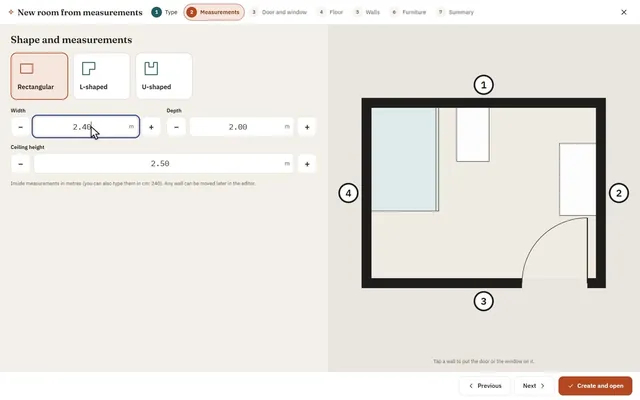
-
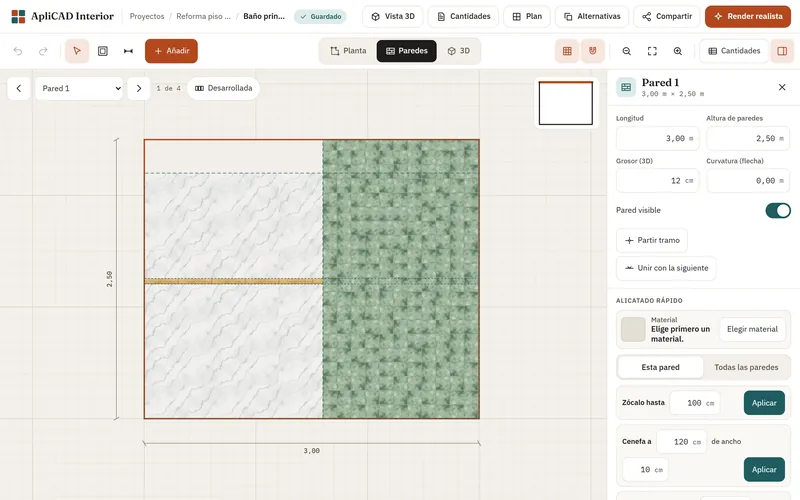
Type in the dimensions.
With the wizard you choose the shape (rectangular, L or U), the dimensions, the door, the floor and the walls, and the bathroom comes out drawn, tiled and in 3D. Then you move any wall in the editor.
-
Tile and furnish from your catalogue.
Floor, walls, wainscots, borders and shower area. Straight, brick bond, herringbone, checkerboard or diagonal, and shaped tiles such as hexagons. Vanity unit, shower screen and tray with their sizes and finishes.
-
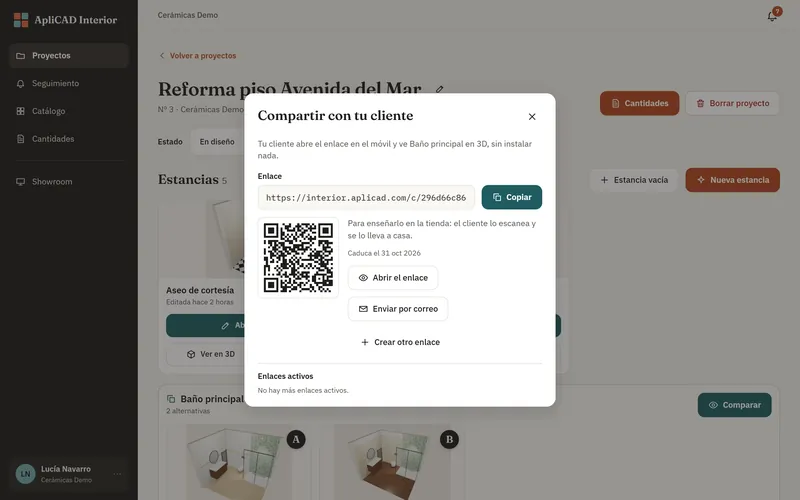
Hand over the 3D and the list.
The customer scans a QR code and takes their bathroom home on their phone. You give them the materials PDF in m² and pieces, with no prices.
The tiling they’ll see on their wall
Try it here: change the pattern and the grout.
- Tile
- Carrara marble 60 × 30 cm
- Grout
- Grey, 4 mm
- Pieces
- 54
This is a sample. In the program, the pattern is applied by zone to the whole bathroom and the quantities follow automatically.
Every tile laid one by one, by zone: floor, walls, wainscots, borders and friezes, shower area and zones within zones. Straight, brick bond, herringbone, checkerboard and diagonal; grout width and colour; start point wherever you want; random shades; special pieces and shaped tiles such as hexagons. Tiled half walls and shelves too.
And tile by tile: remove one, swap it for another material of the same size or put it back as it was. New
The whole bathroom, before the work starts.
-
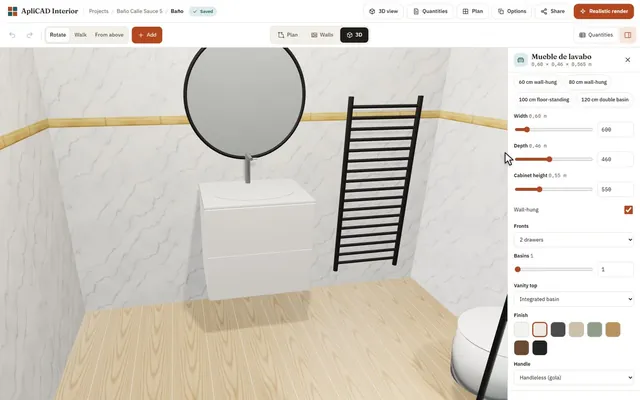
The furniture you sell
5,147 3D models from manufacturer catalogues such as Roca, Salgar, Gala, Duravit, Hansgrohe and Cosmic, plus 16 configurable furniture types with sizes, finishes and handles. In the 3D you drag them: they snap to the wall, show their dimensions and warn you if they collide. And “Dress up” adds towels, plants and bath mats in one click. New
-
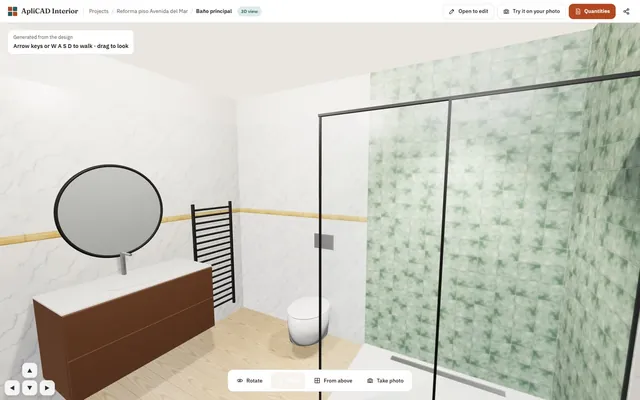
A 3D you can walk into
Real 3D, not a picture: the customer orbits the bathroom, sees it from above and walks through it. One button gives a realistic render computed on your own computer (it uses a dedicated graphics card if there is one), with no render fees.
-
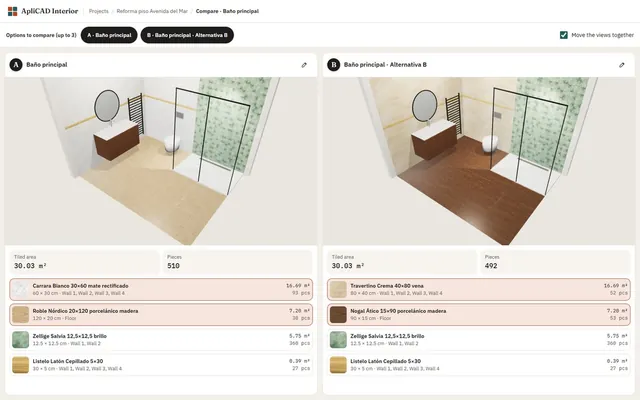
Two or three options side by side
When the customer hesitates, prepare A, B and C alternatives of the same bathroom and compare them with their 3D and quantities. If they change their mind about a tile, you change it once and it changes across the whole design.
-
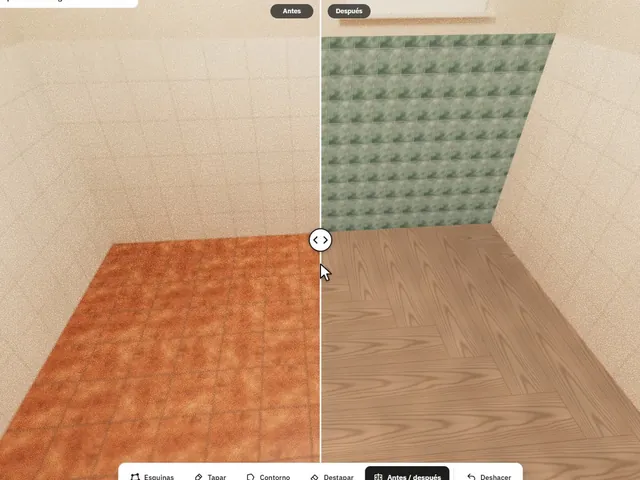
On a photo of their bathroom
Take a photo of the customer’s bathroom or kitchen, mark the corners of the floor and walls and show them how the tile they are looking at would look. The light and shadows of the photo stay. Compare before and after and save it in their project.
-
Counter PC
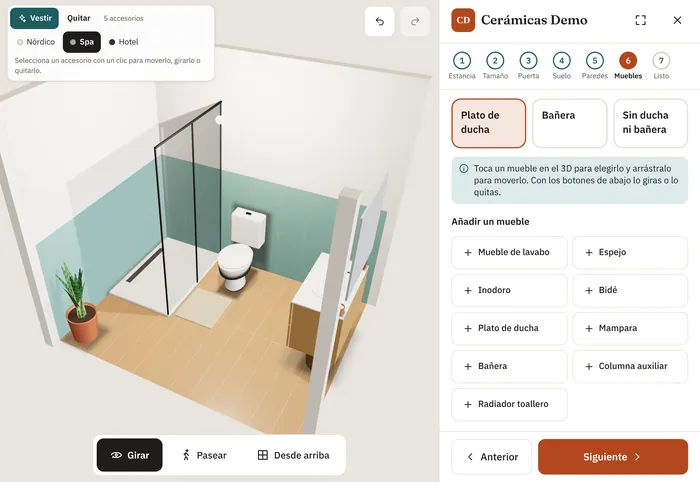 Showroom tabletCustomer’s phone
On any screen, in your language
On the counter PC, the showroom tablet (it installs like an app) and the customer’s phone. In English, Spanish, French, Italian, German, Portuguese and Romanian.
Quantities, worked out the way you would.
m² and pieces for each material, by zone. Quantities checked against 19,930 real rooms from stores: they match in 98.95%.2
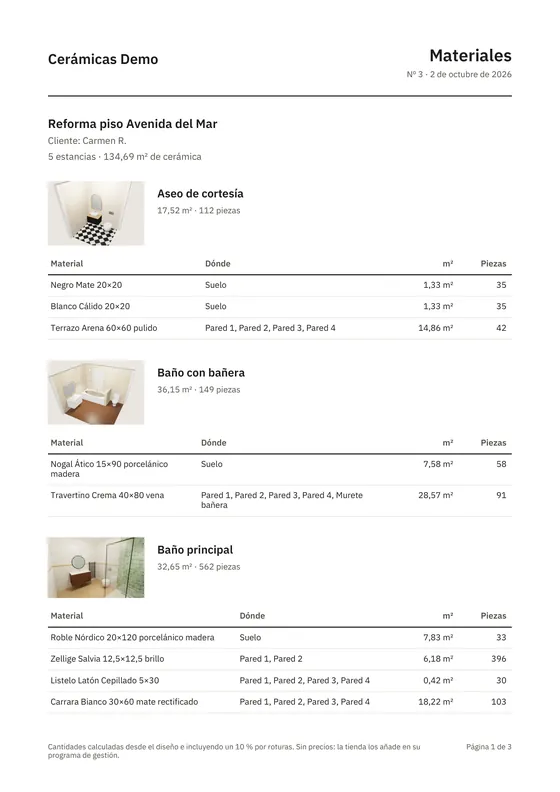
A PDF for the customer
With the materials, their codes, m² and pieces, grouped by room and with the 3D image.
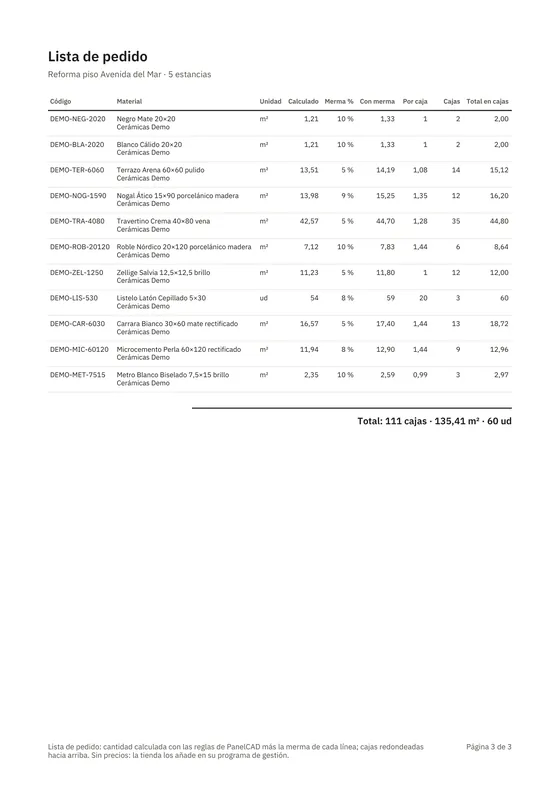
Order list
The same quantity plus the wastage for each line, rounded up to boxes using the packaging in your catalogue. Download it as CSV or copy it into your management software.
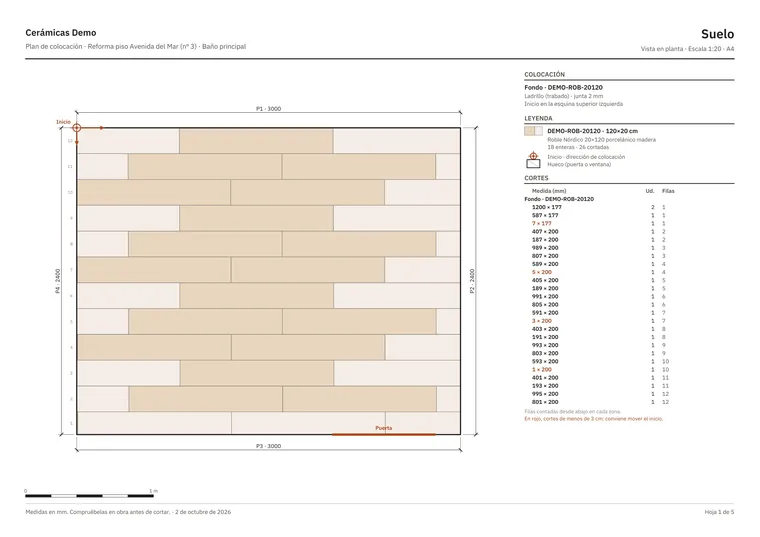
Installation plan
A scale drawing for each tiled surface, with whole and cut pieces, dimensions in millimetres and the start point. The tiler prints it and measures on it.
- No prices Your management software adds them, with your rates and discounts.
- You set the wastage Per material, and it is the same in the PDF and in the order.
Your customer takes their bathroom home on their phone.
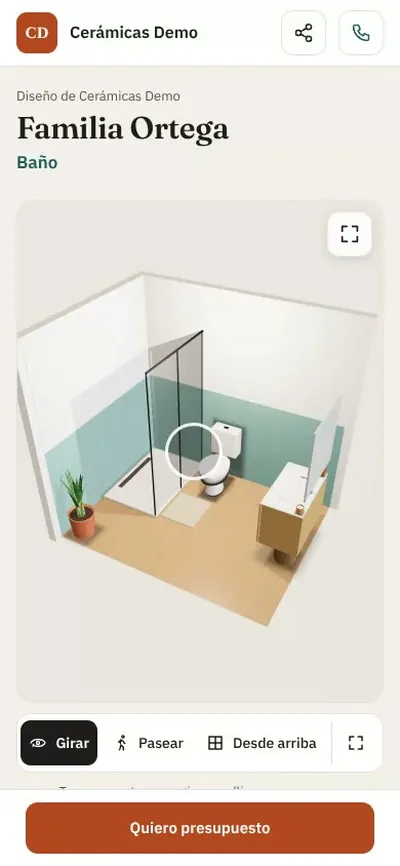
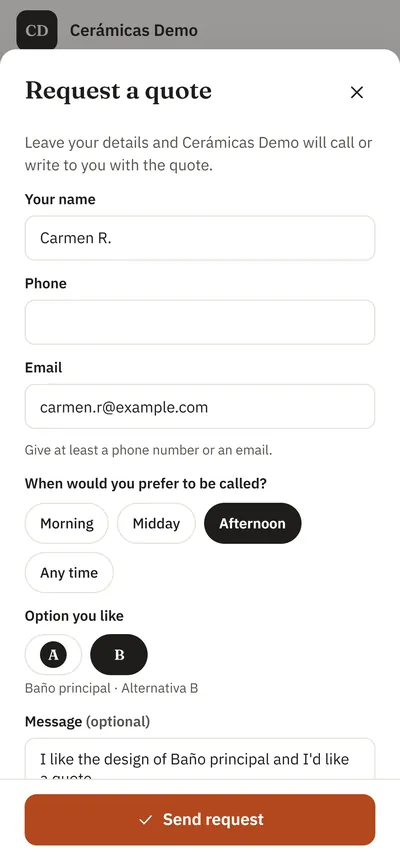
A link or a QR code, nothing to install. At home they orbit and walk through the bathroom and show it to anyone. If they like it, they ask you for a quote from the same page.
-
Their page, with your store’s branding New
The 3D in full screen, photos and renders in a carousel, large material swatches and their alternatives, with a button to share it. Plus your details so they can call you, message you on WhatsApp or find the store.
- You decide what they see: just the 3D, or the materials and quantities too.
- Set an expiry date and revoke the link whenever you want.
- It carries your store’s name and logo.
-
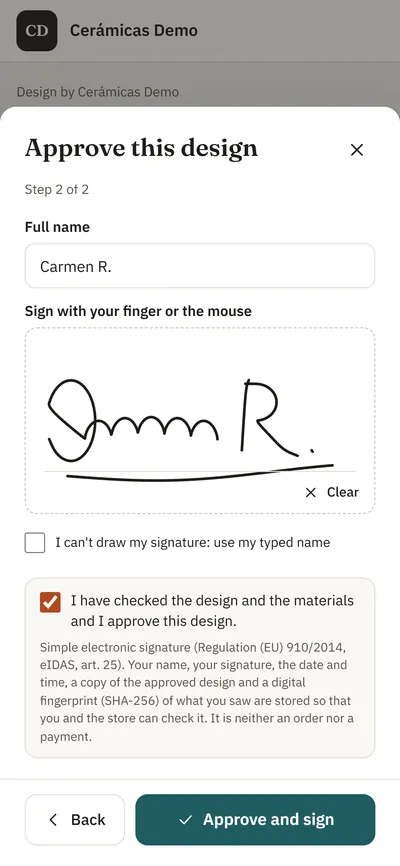
They approve the design with their signature
From the same link they review the design and the materials and approve it by signing on their phone. A PDF receipt records the date and a copy of the approved design.
-
You know who to call
In Follow-up you see which links have been opened, the quote requests and the approvals, with reminders so nobody is left waiting.
The showroom tablet, turned into a fitting room.
In the showroom, the customer designs their bathroom or kitchen step by step: they choose the room, drag the walls with a finger to its size and add the door, floor, walls and furniture, with the 3D changing at every tap. Leaving or saving needs the staff PIN. When you create the project, they take it home on their phone with a QR code. New
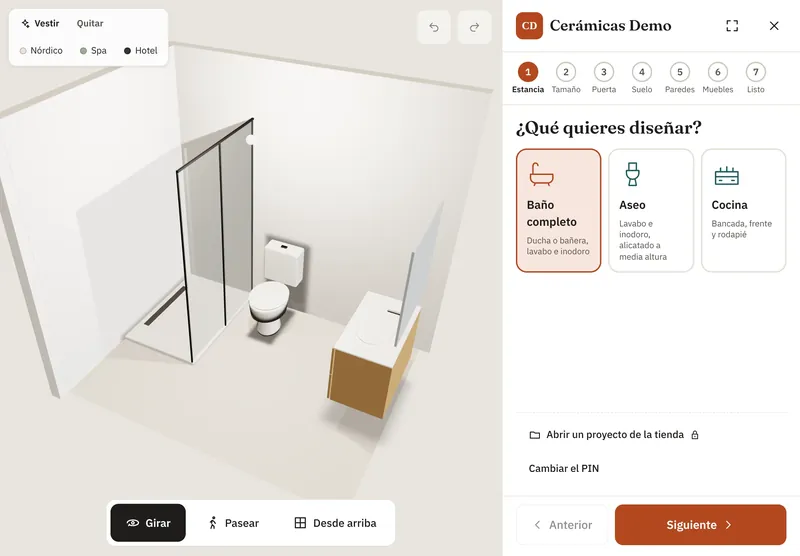
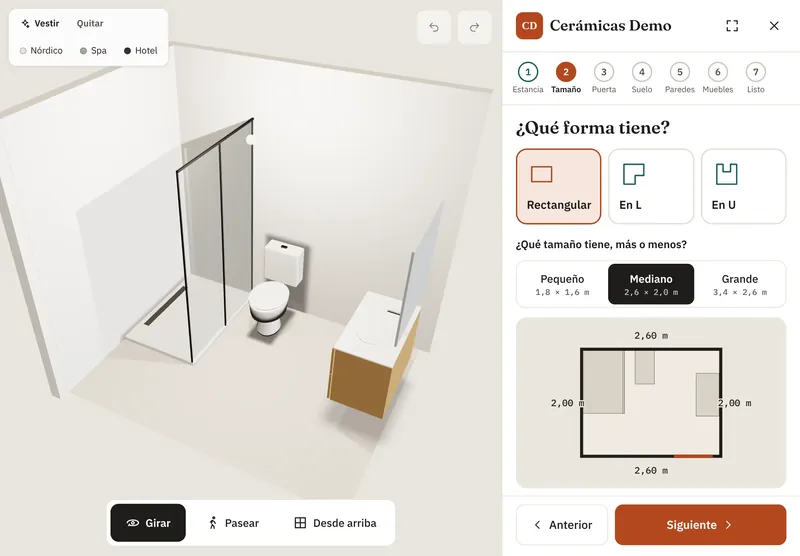
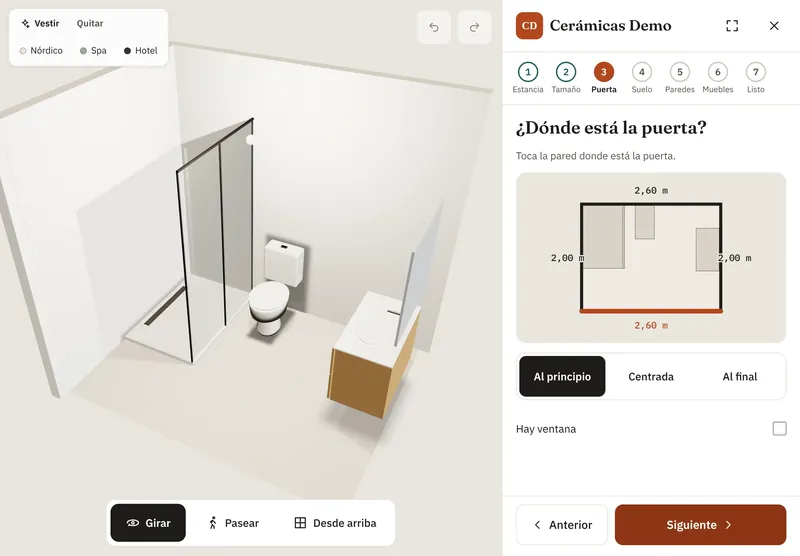
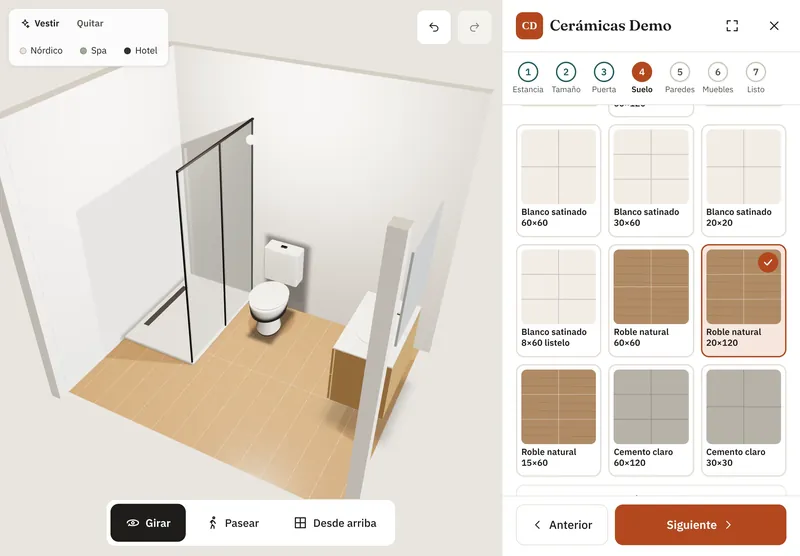
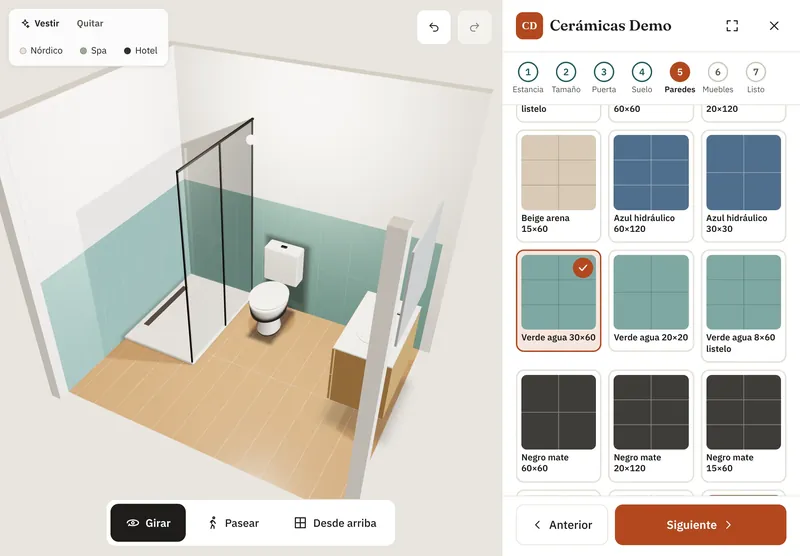
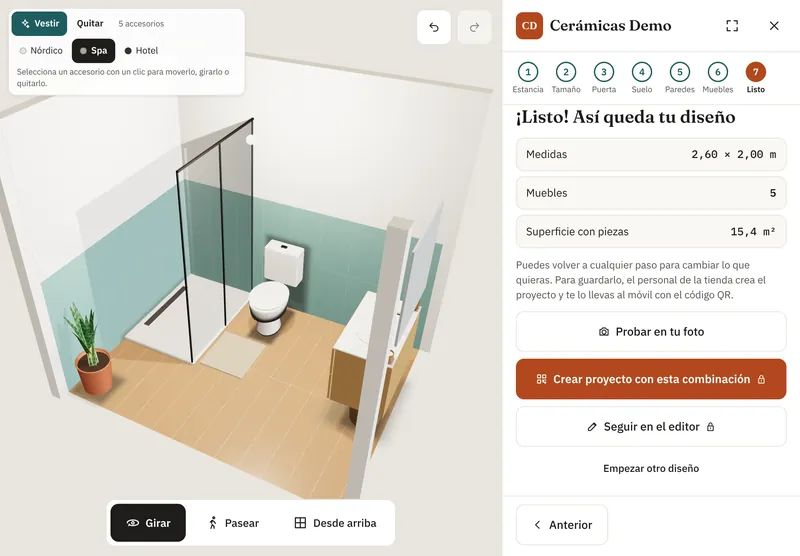
In the showroom, the customer designs their bathroom or kitchen step by step: they choose the room, drag the walls with a finger to its size and add the door, floor, walls and furniture, with the 3D changing at every tap. Leaving or saving needs the staff PIN. When you create the project, they take it home on their phone with a QR code. New
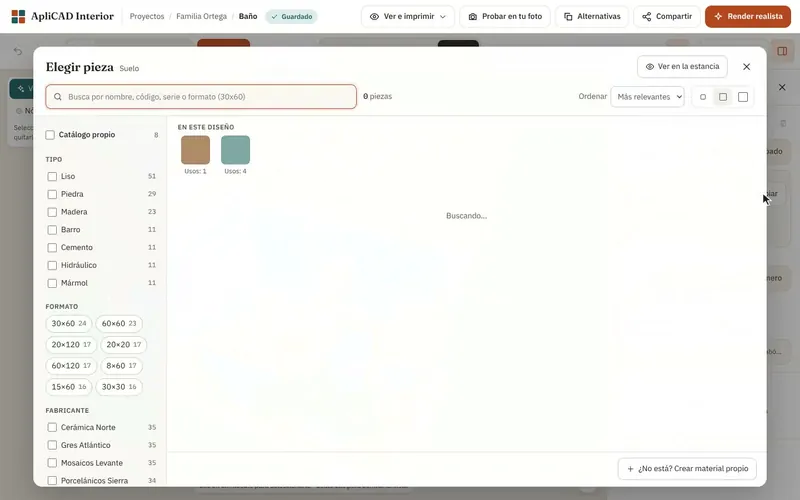
Your showroom, inside the program.
In the real store rooms we analysed, 91% are designed with the store’s own catalogue. That is why your catalogue comes first:
- Import it from Excel or CSV, with images and packaging data.
- Try it before you choose it: the catalogue opens large, with filters, and with “See in the room” you hover over a tile and see it in the design. New
- And also materials from more than 80 manufacturers, and you hide the ones you don’t work with.
- The same catalogue for all your sales staff.
What changes compared with what you already know
Swipe the table to see every column.
| What we compare | ApliCAD Interior Web | Desktop tile CAD | Photo visualisers | Manufacturer configurators |
|---|---|---|---|---|
| No installation, in the browser | Yes | No (Windows, often with a dedicated graphics card) | Yes | Yes |
| On the tablet and the customer’s phone | Yes | Depends on the program, with extra modules | Yes | Yes |
| Your catalogue and several brands in the same bathroom | Yes | Yes | The brands that are loaded | One brand only |
| Tiling by zone with borders, wainscots and special pieces | Yes | Yes | No | Partly |
| m² and pieces by zone | Yes | Yes | No | Some |
| Price | €890 per user per year | ≈ €1,700–4,750 in the first year; then ≈ €720–770 a year for maintenance3 | From free to over €600 a month per store3 | Free |
One price per user, out in the open.
Sales user
€890
per user per year
That’s €74 a month. Or €89 a month if you pay monthly. Excl. VAT.
15-day trial with your 10 best-selling tiles, no card needed. When you subscribe, you import the rest from Excel or CSV. It ends on its own: nothing to cancel.
- Every feature: tiling, furniture, 3D and render, quantities, PDF and order list, link and QR, showroom.
- Your catalogue plus materials from more than 80 manufacturers.
- Invite your team: everyone signs in with their own account.
- The showroom tablet comes with a salesperson’s account: you don’t pay for an extra user.
- Support and new versions included.
- Seven languages: English, Spanish, French, Italian, German, Portuguese and Romanian.
Several sales staff or a chain?
We’ll put together the price for several users or for every store in your chain.
To subscribe, press “Subscribe” in the program or write to us: we call you and activate your store without losing anything from the trial.
How many sales does it take to pay for it?
Enter your own figures. This is not a promise of sales: it only tells you how many extra bathrooms a year cover the licence. Nothing is stored or sent.
Book a 15-minute demo
By video call, with a link that opens in the browser. If your store is nearby, we can come to you. With your logo and tiles similar to the ones in your showroom. This is what you will see:
- 0–2 min
How you work today.
- 2–6 min
A bathroom with your dimensions, tiled with tiles like yours.
- 6–8 min
“See in the room”.
- 8–10 min
Quantities and order list.
- 10–13 min
The QR code on your phone, with your logo.
- 13–15 min
When we start.
Render, showroom or follow-up, only if you ask for them.
Or write to us directly:
Call us on +34 964 72 48 70, Tuesday to Thursday mornings. There is no online calendar: we reply within one working day to set the day and time.
Frequently asked questions
Do I need to install anything?
No. It runs in the browser on your PC or tablet; on the showroom tablet you can install it like an app. Your customer opens their design on their phone without installing anything.
What computer and tablet do I need?
On the PC, an up-to-date Chrome or Edge. On the tablet, Chrome (Android) or Safari (iPad). Plus an internet connection. You don’t need a design PC: a dedicated graphics card is optional and, if the computer has one, the realistic render uses it and finishes sooner.
I already have ViSoft or another program. Why would I want this?
For the visit: you design on the tablet with the customer in front of you and they take the bathroom home on their phone, without waiting for the design PC. Try it with the same bathroom in both.
We outsource the 3D. What changes?
Here your salesperson does it during the visit, without waiting days or paying for each project separately.
How does the trial work?
You sign up yourself: create your account and your store and invite your team. Try it for 15 days with your 10 best-selling tiles and every feature. When you subscribe, you import the rest from Excel or CSV. No card needed, and it ends on its own on day 15. If you subscribe, you carry on where you left off.
How do I subscribe and how do I cancel?
From the trial, with “Subscribe”, or by writing to us: we call you and activate your store. If you don’t renew, your projects become read-only and the links you sent keep working. The annual plan does not renew on its own; the monthly direct debit does, and you can cancel it whenever you want.
Are the quantities reliable?
Quantities checked against 19,930 real rooms from stores: they match in 98.95%. During the trial, check it yourself with a bathroom you have already quoted.
Can I use my own catalogue?
Yes. Import it from Excel or CSV with images and packaging, and you also get materials from more than 80 manufacturers.
Does it calculate boxes?
Yes, in the order list: it adds the wastage you set for each material to every line and rounds up to boxes using your catalogue’s packaging. Download it as CSV for your management software.
Why are there no prices in the PDF?
Your prices and discounts live in your management software. The PDF gives materials, codes and quantities.
What if the customer takes the design to another store?
You decide what they see on the link, how long it lasts, and you can revoke it whenever you want.
What about my customers’ data?
It belongs to your store. We process it on your behalf, under the data processing agreement included in the terms of service, and accounts use Auth0 with the data in the European Union. The customer page does not store their IP address, and what they write when asking for a quote only reaches your store.
Which languages is it in?
English, Spanish, French, Italian, German, Portuguese and Romanian. Each team member picks their own in their account.
Design your next bathroom with the customer in front of you.
Try it free for 15 days, no card needed. If you’d rather see it first, we’ll show you in 15 minutes.
The trial ends on its own on day 15.